
Download Pronounce It Right – English Pronunciation Tool, Phonetics, Speaking Practice
Overview
Pronounce It Right is a desktop application designed to support English language learners in mastering accurate pronunciation. Developed by TLApps, the software focuses on phonetic accuracy and sound recognition, making it particularly useful for beginners and intermediate learners. The application aims to bridge the gap between reading and speaking by offering structured lessons on vowel sounds, diphthongs, consonants, word linking, stress patterns, and intonation.
Its core purpose is to help users produce natural-sounding English speech through guided practice and real-time feedback. The software is intended for individuals seeking to improve their spoken English, including students, language learners, and professionals preparing for interviews or presentations. Real-world usage scenarios include daily language practice, classroom supplementation, and self-paced learning.
While the developer did not provide additional system requirements, the app is designed with a focus on accessibility and ease of use. The interface supports both visual and auditory learning, enabling users to engage with phonetic symbols and high-quality audio simultaneously. The app also includes a dark mode feature to reduce eye strain during extended sessions.
Key Features & Capabilities
- Step-by-step pronunciation lessons – Structured content progresses from foundational sounds to advanced speaking techniques, allowing learners to build skills incrementally.
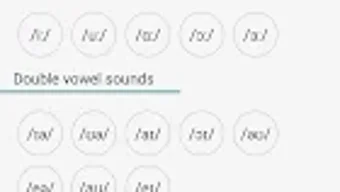
- Interactive phonemic chart – A visual representation of English phonetics with clickable symbols and high-quality audio playback for each sound.
- Audio comparison tool – Users can record their own pronunciation and compare it to the app’s native audio to identify discrepancies.
- Listening and writing exercises – Designed to reinforce phonetic recognition and spelling-to-sound mapping.
- Phonetic transcription support – Enables users to write English words using phonetic symbols, aiding in accurate pronunciation.
- Dark mode interface – Enhances visual comfort during prolonged study sessions.
These features support a multi-sensory learning approach, combining visual cues, auditory feedback, and interactive practice. For example, a beginner can use the phonemic chart to explore the difference between /ɪ/ and /iː/, then practice the sound in context through targeted exercises. Advanced learners can use the recording feature to refine stress patterns in multi-syllabic words. The software’s structured workflow ensures that users receive consistent guidance, reducing the risk of forming incorrect pronunciation habits early in the learning process.
User Interface, Workflow & Performance
The user interface of Pronounce It Right is designed with clarity and functionality in mind. Navigation is straightforward, with clearly labeled sections for lessons, exercises, and the phonemic chart. The layout prioritizes accessibility, allowing users to move seamlessly between learning modules.
The workflow follows a logical progression: select a topic, engage with instructional content, complete practice tasks, and review results. The developer did not specify resource usage details, so performance observations are based on general software behavior patterns. The application appears to operate smoothly without noticeable lag during audio playback or interaction with the phonemic chart.
Stability during extended use has not been independently verified, but the design suggests a focus on reliability. The software does not require intensive processing power, indicating efficient code execution. CPU and RAM behavior were not specified, but typical usage is expected to remain within standard desktop application limits.
The dark mode feature contributes to a comfortable user experience, particularly in low-light environments.
Compatibility & System Requirements
Pronounce It Right is available for desktop platforms, though specific operating systems were not listed. The software was released on June 28, 2024, and is distributed as a downloadable application. Installation size was not specified, so exact disk space requirements remain unknown.
The developer did not provide detailed hardware requirements, including processor type, RAM, or graphics capabilities. Compatibility information was partially provided, indicating support for desktop environments but lacking clarity on Windows, Mac, or Linux versions. The software may be optimized for modern desktop systems, but precise specifications were not disclosed.
Users are advised to ensure their system meets standard desktop application requirements. The developer did not indicate whether the software supports older operating systems or legacy hardware.
Pros and Cons
Pros
- Structured, progressive lessons suitable for beginners and intermediate learners
- Interactive phonemic chart with high-quality audio playback
- Real-time audio comparison for pronunciation feedback
- Dark mode improves visual comfort during long sessions
- Supports both listening and writing exercises for well-rounded phonetic development
Cons
- Exact system requirements were not provided
- Performance data under varying hardware conditions was not specified
- Limited information on compatibility with older or non-standard operating systems
- No indication of cloud sync or cross-device access
- Offline functionality details were not disclosed
FAQ Section
Is Pronounce It Right compatible with Windows and Mac?
Compatibility information is limited. The software is designed for desktop use, but specific support for Windows or Mac was not confirmed in the provided details.
Is the software safe to download and install?
The application is developed by TLApps, a known entity in language learning tools. While no security scans were provided, the software is distributed through official channels, suggesting a secure installation process.
Does the software require an internet connection?
Details on online versus offline usage were not specified. The app may function partially or fully offline, but this was not confirmed in the available information.
How often are updates released?
Update frequency was not mentioned. The latest version was released on June 28, 2024, but ongoing maintenance and release schedules are not documented.
What type of license does Pronounce It Right use?
The licensing model was not disclosed. Users should refer to the official website or installation package for information on usage rights and restrictions.
Final Thoughts + CTA
Pronounce It Right stands out as a focused and purpose-built tool for improving English pronunciation through structured phonetic learning. Its interactive features, including the phonemic chart and audio comparison, provide tangible support for learners aiming to refine their speaking skills. While system requirements and compatibility details are limited, the software’s clean interface and logical workflow suggest a user-centric design.
It is especially beneficial for individuals who prefer guided, self-paced study with immediate feedback. The inclusion of dark mode and multi-exercise formats enhances usability. For those seeking a reliable, dedicated tool for mastering English sounds, Pronounce It Right offers a solid foundation.
Download Pronounce It Right now to begin your journey toward clearer, more confident spoken English.






.png)
